Understanding Game Lag
For gamers in Malaysia, experiencing game lag can be incredibly frustrating. Game lag refers to the noticeable delay between a player's input and the game's response, which can severely diminish the gaming experience. Imagine trying to execute a complex move in your favorite mobile game, only to find your action delayed. This not only affects your performance but can also lead to missed opportunities and, ultimately, disappointment.
In 2026, mobile gaming continues to thrive in Malaysia with titles like PUBG Mobile, Mobile Legends, and Genshin Impact dominating the scene. However, these advanced graphics and dynamic gameplay can often lead to performance issues, with game lag being one of the most common complaints among players.
Common Causes of Lag
Before diving into solutions, it's essential to understand the common causes of game lag on Android devices. Identifying the root cause can help you apply the right fix effectively.
- Hardware Limitations: Many Android devices, particularly older models, may struggle to handle graphically intensive games. Insufficient RAM or an outdated processor can lead to sluggish performance, resulting in lag.
- Network Issues: Poor internet connectivity is a primary cause of game lag on mobile devices. High latency, slow speeds, or dropped connections can disrupt gameplay, especially in online multiplayer games.
- Background Processes: Apps running in the background can consume valuable resources, leading to decreased performance. Whether it's a social media app or a system update, these processes can impact your gaming experience.
Understanding these causes can empower you to take steps toward reducing lag and enhancing your overall gaming experience.
Optimizing Game Settings
One effective way to combat game lag is by optimizing your in-game settings. Most modern games allow players to adjust graphical settings for better performance. Here are some tips for optimizing your game settings:
- Lower Graphics Quality: If you're experiencing lag, consider reducing the graphics quality. This can significantly improve frame rates and reduce input delay.
- Disable V-Sync: While V-Sync can eliminate screen tearing, it can also introduce input lag. Disabling it might improve responsiveness in fast-paced games.
- Adjust Frame Rate: Some games allow you to set a specific frame rate. Opting for a lower frame rate can reduce the load on your device and minimize lag.
- Turn Off Shadows and Effects: Disabling shadows, reflections, and other effects can lessen the graphical load, making for a smoother gaming experience.

Each game is unique, so take the time to experiment with settings to find the optimal configuration for your device. Remember that finding the right balance between aesthetics and performance is key.
Recommended Apps
In addition to in-game optimization, there are several apps available that can help reduce lag and improve gaming performance on Android devices. Here are some top recommendations:
- Game Booster: This app optimizes your Android device by freeing up RAM and closing background apps, allowing for smoother gameplay.
- Network Signal Info: Monitor your network's signal strength and latency to identify any connectivity issues that might be causing lag.
- Greenify: A great tool for hibernating apps that run in the background, Greenify can help conserve resources and enhance game performance.
- CCleaner: This app can help clean up unnecessary files and cache, freeing up space and resources for your games.
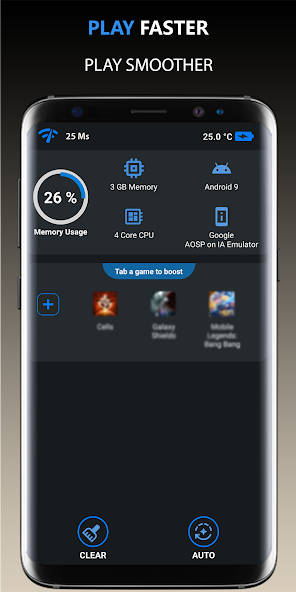
These apps can be a game-changer, especially when combined with in-game settings adjustments. They help you squeeze every bit of performance out of your device.
System Updates and Maintenance
Finally, keeping your Android device updated is crucial for optimal performance. Updates often include bug fixes, performance enhancements, and new features that can improve your gaming experience. Here are some maintenance tips to consider:
- Regularly Check for Updates: Ensure that both your Android operating system and your games are up to date. This can help resolve known issues that may contribute to lag.
- Clear Cache: Regularly clearing cache files can free up space and improve your device’s performance.
- Uninstall Unused Apps: If you're not using certain apps, consider uninstalling them to free up resources.
By performing regular maintenance, you can ensure that your device operates smoothly and reduces the chances of encountering game lag.
FAQ
What causes game lag on Android?
Game lag on Android can be caused by several factors, including hardware limitations, network issues, and background processes. Devices with insufficient RAM or processing power may struggle with demanding games, while poor internet connectivity can cause delays in online gameplay.
How can I boost performance for gaming on Android?
To boost performance for gaming on Android, consider optimizing your game settings, using performance-enhancing apps, and keeping your device updated. Lowering graphics settings, disabling unnecessary background apps, and performing regular maintenance can significantly reduce lag and improve your gaming experience.
In summary, tackling game lag on Android in 2026 requires a multi-faceted approach. By understanding its causes, optimizing settings, utilizing helpful apps, and maintaining your device, you can enhance your gaming experience and enjoy a smoother, lag-free adventure. Happy gaming, Malaysia!