Introduction
Game lag is an all-too-familiar term for many Android gamers, especially in Malaysia and the broader Southeast Asian region. With a rapidly growing gaming community, the experience of lag can be frustrating, affecting enjoyment and performance. In 2026, over 70% of Android users report encountering issues with game lag, a problem that can significantly impact gameplay. Fortunately, there are solutions available to help mitigate these issues, allowing gamers to get back to what they love most—gaming.

Causes of Game Lag
Understanding the causes of game lag is crucial for effective troubleshooting. There are two primary categories of factors: hardware limitations and software issues.
Hardware Limitations
Many users in Malaysia are still using older Android devices, particularly models from popular brands like Samsung and Xiaomi. These devices often struggle with newer, graphically demanding games. For instance, older Snapdragon processors may not handle high frame rates efficiently, resulting in lag during gameplay. Additionally, limited RAM and storage capacity can also hinder performance, leading to stuttering and delays.
Software Issues
Another major contributor to game lag is software-related problems. Background apps can consume precious system resources, leaving less power available for gaming. Additionally, running an outdated version of the operating system or the game itself can lead to compatibility issues, further exacerbating lag. Ensuring your device is updated and apps are managed effectively is key to maintaining optimal gaming performance.
Quick Fixes
If you're experiencing lag during gameplay, several immediate actions can help reduce the issue. Here are some quick fixes to consider:
- Close Background Apps: Before starting your game, make sure to close all unnecessary applications running in the background.
- Clear Cache: Regularly clearing the cache of both your device and individual apps can free up valuable resources.
- Disable Auto-Sync: Temporarily turning off auto-sync for apps like email and social media can help improve performance.
- Switch to Airplane Mode: This can help reduce network interruptions, especially during online gaming sessions.
Advanced Solutions
If the quick fixes don't resolve your lag issues, consider delving into more advanced solutions. These methods often require a bit more technical know-how but can yield significant improvements.
Optimization Apps
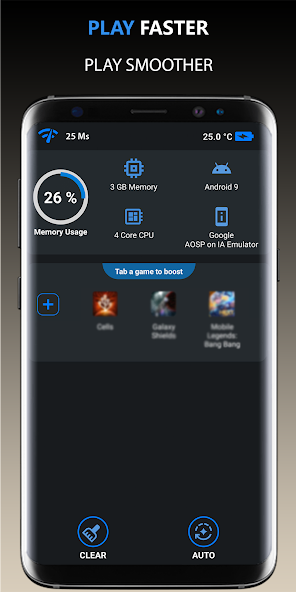
There are numerous apps available designed specifically to enhance gaming performance on Android devices. Apps like Game Booster and GFX Tool can optimize game settings, improve FPS, and reduce lag. These apps often allow users to customize performance settings tailored to their specific device capabilities. By allocating more resources to your game while minimizing background processes, you can significantly enhance your gaming experience.

Adjusting Game Settings
Many mobile games offer various settings that can be adjusted to improve performance. Lowering the graphics quality, disabling shadows, or reducing the resolution can all help to increase FPS and minimize lag. Here is a general guide on what settings to modify:
- Graphics Quality: Set to low or medium to reduce strain on your device.
- Frame Rate: If available, set the frame rate to a lower option to maintain smoother gameplay.
- Disable V-Sync: Turning off vertical sync can reduce input lag.
User Experiences
Real-world testimonials from the Malaysian gaming community highlight the effectiveness of these solutions. For example, Ahmad, a gamer from Kuala Lumpur, shared his success story after optimizing his Samsung Galaxy device. “I was facing constant lag while playing my favorite battle royale game. After using a game optimization app and lowering my graphics settings, I noticed a 50% improvement in performance!”
Similarly, Mei Ling, a devoted mobile RPG player, found that regularly clearing her app cache and closing background applications reduced lag significantly, allowing her to enjoy her gaming sessions without interruptions.
Frequently Asked Questions
What causes game lag on Android?
Game lag on Android can be caused by hardware limitations, such as older processors and insufficient RAM, as well as software issues like background apps and outdated operating systems.
How can I boost my Android's gaming performance?
To boost gaming performance on Android, try closing background apps, clearing the cache, using optimization apps, and adjusting in-game settings for better performance.
By implementing these strategies, Malaysian gamers can tackle game lag effectively, ensuring that their gaming experiences are smooth and enjoyable. Don't let lag hold you back; take action today and elevate your gaming performance!