Understanding Game Lag
Game lag is a term that describes the delay between your actions in a game and the game's response to those actions. This delay can severely hamper your gaming experience, especially in fast-paced genres like first-person shooters or multiplayer online battle arenas (MOBAs). In Malaysia, where gaming has become a significant part of youth culture, experiencing game lag can be frustrating and can lead to lost matches and decreased enjoyment.
The effects of game lag are not just limited to delays; they can also manifest as stuttering, frame drops, and connection timeouts. These issues can disrupt your concentration and ruin your competitive edge, making it crucial for Malaysian gamers to understand how to fix game lag on their Android devices. Reducing game lag can significantly enhance your gaming experience, providing smoother gameplay and a more immersive environment.
Common Causes of Lag
Understanding what causes game lag is the first step in finding a fix. Here are some of the most common factors contributing to lag on Android devices:
- Device Specifications: The performance of your Android device plays a significant role. Older devices may struggle with newer games that require more processing power and memory.
- Network Issues: A stable internet connection is essential for online gaming. High latency and weak signals can lead to significant lag. In Malaysia, fluctuating internet speeds can be a common issue.
- Background Processes: Running multiple applications in the background can consume valuable resources, leading to reduced performance in games.
- Overheating: Mobile devices can overheat during extended gaming sessions, which can throttle performance and cause lag.
Identifying these causes can help you pinpoint the issue and apply the appropriate fix. For instance, if network instability is a concern, you may want to switch from Wi-Fi to a mobile data connection or vice versa.
Optimizing Game Settings
One of the simplest ways to enhance performance and reduce game lag is to adjust the in-game settings. Here are some effective optimization tips:
- Lower Graphics Settings: Reducing the resolution and visual effects can free up resources, leading to smoother gameplay.
- Disable V-Sync: Turning off vertical synchronization can help eliminate input lag, although it may introduce screen tearing.
- Adjust Frame Rate: Some games allow you to choose a frame rate cap. Opting for a lower cap can reduce lag, especially on older devices.
- Turn Off Unnecessary Features: Features like shadows, anti-aliasing, and motion blur can be resource-intensive. Disabling these can improve performance.
After making these adjustments, you should notice a significant improvement in your gaming performance. For many Malaysian gamers, fine-tuning these settings can be the difference between winning and losing in competitive play.

Recommended Apps
In 2026, several apps can help optimize your Android device for gaming, reducing lag and improving overall performance. Here are some top recommendations:
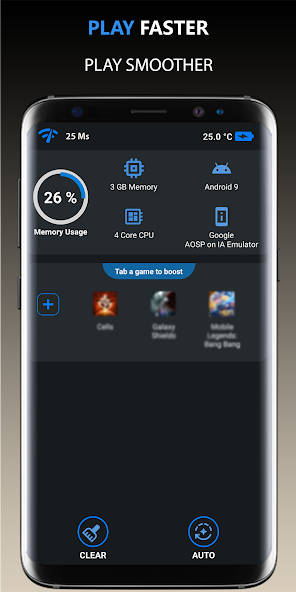
- Game Booster: This app optimizes your device’s performance by clearing unnecessary background processes, giving your game more resources to work with.
- CCleaner: Known for cleaning junk files, CCleaner can help free up storage space, which can lead to better performance in games.
- Network Signal Info: This app helps you track your internet connection's strength and stability, allowing you to identify and fix network-related issues.
- Game Mode: Many Android devices now come with a built-in game mode that optimizes performance and limits notifications while gaming.
Using performance optimization apps can lead to better game performance, allowing for a more enjoyable gaming session. Whether you’re playing casual games or delving into more competitive titles, these tools can be invaluable.
System Updates and Maintenance
Keeping your Android device updated is crucial for optimal performance. Regular software updates often include performance enhancements and bug fixes that can help reduce game lag. Check for system updates frequently to ensure you’re running the latest version of Android.
Additionally, performing regular maintenance checks can go a long way in optimizing your device. Here are some maintenance tips:
- Clear Cache: Regularly clearing your app cache can help free up storage space and improve performance.
- Uninstall Unused Apps: If you have apps you no longer use, uninstalling them can help free up system resources.
- Restart Your Device: A simple restart can clear temporary files and free up memory, often improving performance.
By keeping your device well-maintained and updated, you can ensure a smoother gaming experience with minimal lag. In the vibrant Malaysian gaming community, where competition is fierce, every advantage counts.
FAQ
What causes game lag on Android?
Game lag on Android can be caused by various factors, including device specifications, network issues, background processes, and even overheating. Identifying these issues is the first step toward finding a solution.
How can I boost performance for gaming on Android?
To boost performance for gaming on Android, you can optimize game settings, use performance-enhancing apps, keep your device updated, and perform regular maintenance checks. Adjusting graphics settings and clearing background processes can also help reduce game lag.
By understanding the various aspects of game lag and implementing these strategies, Malaysian gamers can significantly enhance their gaming experience on Android devices in 2026. Whether you're competing against friends or diving into the latest mobile games, a lag-free experience is essential for enjoying your favorite titles to the fullest.